**Grok can now answer questions about what the smartphone camera is looking at. xAI called it Grok Vision. Google’s Gemini and OpenAI's ChatGPT offer similar features.**
Image: Generated with AI
## The details
* According to Ebby Amir (Employee at xAI), you can now point your phone at objects like documents, signs, or products and ask questions about them. Additionally, Grok can also analyze the content of the smartphone screen.
* Currently, Grok Vision is only available for iPhone users. Android users will have to wait a little longer. For Grok Vision, you need a paid subscription (SuperGrok).
* Another new feature is the real-time search in Grok’s voice mode. This also requires the SuperGrok subscription.
Grok Vision (Image from the video by Ebby Amir)
**Our thoughts**
Grok has gained many new features in the last months, including a “memory component” and a canvas tool for creating documents and apps. In our opinion, Grok is now a strong competitor to Google and OpenAI. It is impressive what the xAI team has achieved in the last two years.
**More information:** 🔗 [TechCrunch](https://techcrunch.com/2025/04/22/xais-grok-chatbot-can-now-see-the-world-around-it/){:target="_blank" rel="noopener"} \| [Grok on X](https://x.com/grok/status/1914821914935353681){:target="_blank" rel="noopener"}
## Magic AI tool of the week
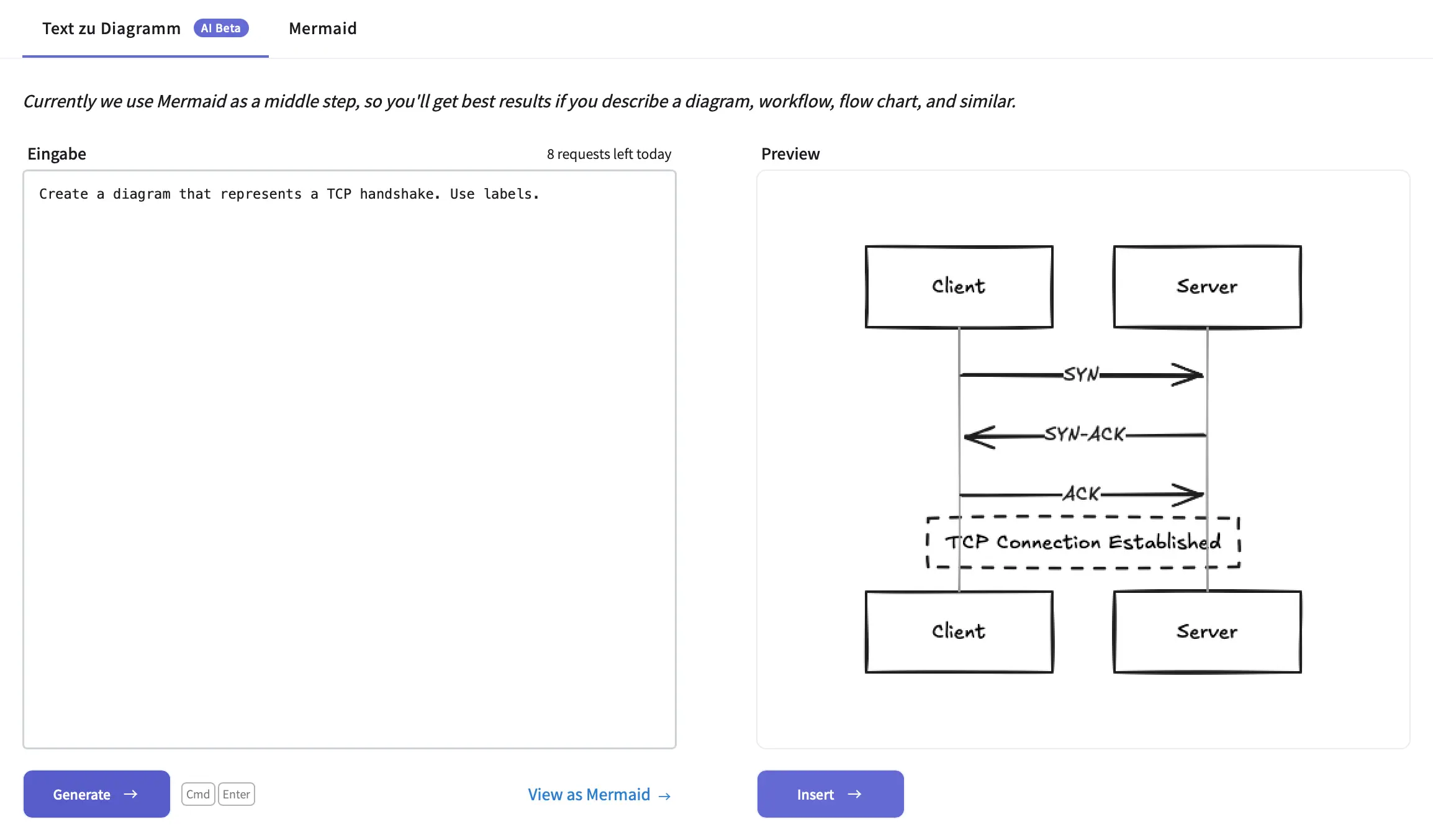
Do you want to create beautiful diagrams for technical topics, such as visualizing a TCP handshake? Then, you need an easy-to-use tool.
Excalidraw is exactly the tool you are looking for! This tool makes it very easy to create diagrams. It is an open-source, privacy-focused, and user-friendly sketching tool. Best of all, you can use AI assistance to create diagrams from a text prompt.
Wow, this is really cool!
**Example:**
Excalidraw AI feature (Screenshot by authors)
We often use [Excalidraw](https://excalidraw.com/){:target="_blank" rel="noopener"} to create hand-drawn diagrams for our social media posts. Additionally, we use this tool to make our [popular data science cheat sheets](https://tinztwinshub.com/blog/). The AI feature is a helpful addition.
## Hand-picked articles of the week
* [Build a Local AI Agent to Chat with Financial Charts Using Agno](https://tinztwinshub.com/investment-research/build-a-local-ai-agent-to-chat-with-financial-charts-using-agno/)
* [Run GenAI Models locally with Docker Model Runner](https://tinztwinshub.com/data-science/run-genai-models-locally-with-docker-model-runner/)
* [Portfolio Allocation - How to Analyze a Stock Portfolio Using Python](https://tinztwinshub.com/investment-research/portfolio-allocation-how-to-analyze-a-stock-portfolio-using-python/)
😀 Do you enjoy our content? If so, why not support us with a small financial contribution? As a supporter, you can comment on newsletter editions (e-mail version) and read our website without banner ads.